Rolling-shutter distortion and motion blur can occur in the same frame but have different causes. Rolling shutter assigns different acquisition times to image rows. Motion blur integrates a moving image during each row or frame exposure.
Frame rate, exposure time and total sensor readout are separate quantities. Raising frame rate does not automatically shorten exposure or eliminate row timing. A global shutter removes row-to-row timing difference but can still blur during exposure.
Use this guide with the event versus frame camera guide and VIO and SLAM guide. Characterize the installed camera, lens, light and robot trajectory together.
Separate row timing from exposure integration
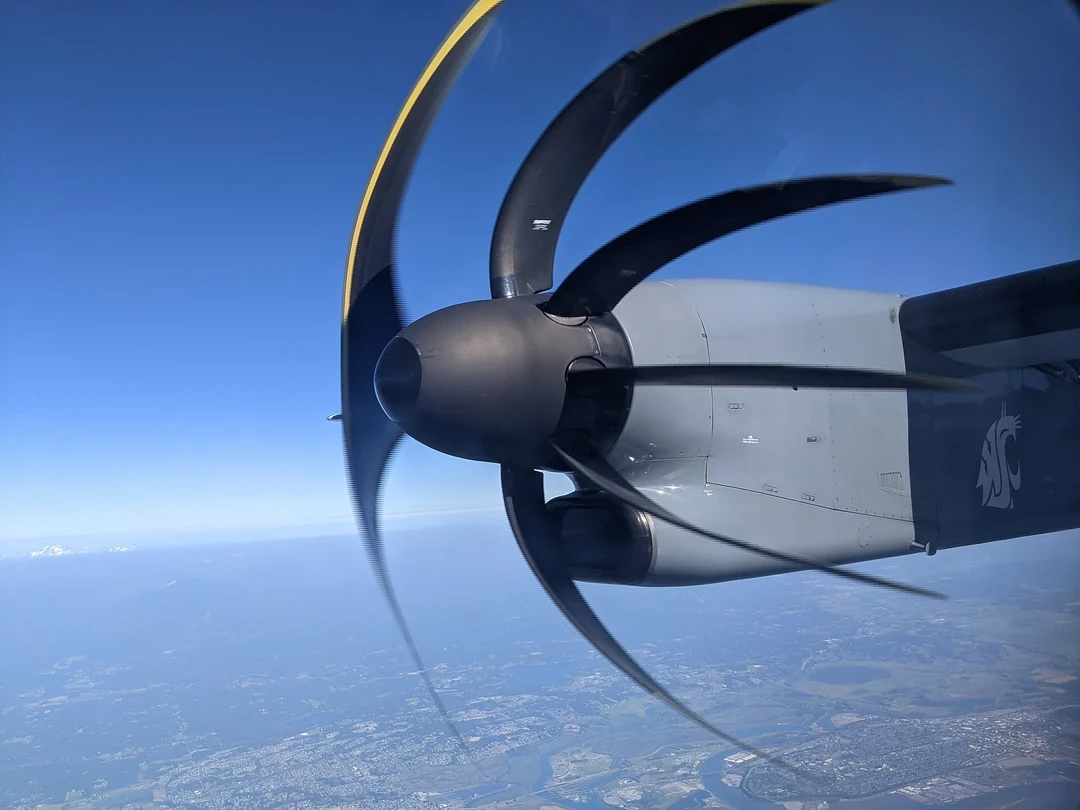
In a rolling shutter, rows begin or end exposure sequentially. A moving line, object or camera can therefore occupy different poses across the image. Straight structures may skew, rotating blades may bend and stereo geometry may become internally inconsistent.
Motion blur occurs because light is accumulated while the projected feature moves. It spreads the feature within each exposure interval even when all pixels share the same global start and stop.
Diagnose both effects before choosing a mitigation.

Compare global and rolling shutter acquisition
A global shutter exposes the full array over a common interval and then stores or reads the result. A rolling shutter sequences rows, which can offer cost, noise, dynamic-range or resolution advantages depending on the sensor implementation.
The Basler rolling-shutter overview explains common rolling behavior and artifacts. Verify the exact camera model and mode because vendors may support several acquisition patterns.
| Timing term | Meaning | Primary artifact | How to measure |
|---|---|---|---|
| Exposure time | Integration duration per row or frame | Motion blur | Controlled moving edge |
| Line time | Delay between row starts | Row-dependent pose | Flashing line or pattern |
| Frame readout | First-to-last row timing | Skew and wobble | Vendor data plus motion test |
| Frame period | Time between frames | Temporal sampling | Trigger log |
| Transport delay | Acquisition to host | Stale state fusion | Hardware event timing |
Record exposure, readout and frame period separately
Exposure may be shorter than frame period, and readout may occupy much of the period. Automatic exposure and gain can change during a task, altering blur and noise even when frame rate stays constant.
Log shutter mode, exposure, gain, line timing and trigger state with every dataset. The Basler exposure documentation illustrates how exposure configuration and actual exposure can depend on camera family and mode.
Budget blur from image speed and exposure
A first estimate of blur in pixels is projected image velocity multiplied by exposure time. Image velocity depends on robot and object motion, depth, focal length and rotation. Near objects and camera rotation can produce severe motion even at modest Cartesian speed.
Set an allowable pixel smear from the feature size or model tolerance, then derive an exposure target. Validate with the real optics because focus, vibration and image processing add apparent blur.
Trade exposure against photons and noise
Shorter exposure reduces motion blur but collects fewer photons. Opening the aperture, adding light or increasing sensor gain can compensate, each with depth-of-field, glare, heat, power or noise consequences.
Do not raise gain without measuring downstream precision. A sharp but noisy image may produce fewer stable features or unreliable depth. Flickering illumination can interact with row timing and create bands.
Account for an eye-in-hand camera pose across rows
A camera on a moving robot wrist can change pose appreciably during one readout. Assigning one rigid camera pose to the whole frame violates projective geometry. Fast rotation is especially damaging because it changes rays across the image regardless of scene depth.
Use trajectory and timestamp data to estimate the pose range within the frame. Slow the robot, choose a faster readout or use a shutter model when required accuracy cannot tolerate the difference.
| Failure symptom | Likely cause | Discriminating test | Mitigation class |
|---|---|---|---|
| Slanted vertical edge | Rolling translation | Moving straight-edge target | Faster readout or model |
| Bent rotating object | Row-time rotation | Known turntable | Global shutter or correction |
| Uniform soft edge | Exposure blur | Exposure sweep | More light or shorter exposure |
| Horizontal bands | Light flicker plus rows | Lamp frequency test | Lighting or synchronization |
| Pose residual varies by row | Wrong frame-time model | Reprojection by row | Line-time calibration |
Choose global shutter when geometry needs one time
Fast manipulation, metrology, stereo depth and visual-inertial estimation often benefit from global exposure because a frame better matches one camera pose. This does not guarantee higher image quality or no blur; exposure, lighting and sensor noise remain.
Choose the camera from measured task error, not shutter label alone. A slow inspection with strong light may work well with rolling shutter, while a fast wrist trajectory may not.
Define the timestamp event and hardware trigger
A timestamp may refer to trigger reception, exposure start, a frame reference row, exposure midpoint, readout completion or host arrival. For rolling shutter, no single time exactly represents every row. Document the reference used by the driver.
Use the robot time-synchronization guide to relate the camera clock to robot state. Verify trigger-to-exposure latency and jitter with hardware evidence where accuracy matters.
Apply rolling-shutter correction only with a valid motion model
Software can estimate row-specific camera pose from IMU, robot kinematics or image motion and warp observations toward a common time. The correction needs line delay, readout direction, intrinsics and sufficiently accurate continuous motion.
The CVPR rolling-shutter camera paper discusses geometry and correction. Correction cannot recover information destroyed by severe blur, saturation or occlusion.
Treat depth and multi-camera geometry as time dependent
Stereo pairs need synchronized exposure and compatible row timing. RGB-D alignment can fail during motion if color and depth use different shutters or timestamps. A rigid extrinsic transform is insufficient when the sensors observe different times.
Use the robot depth-camera guide and test moving edges at several depths. Measure 3D error, not only 2D image appearance.
Validate static optics and dynamic acquisition separately
Start with focus, distortion and a stationary calibration target. Then use a known-speed linear edge, rotating target, flickering light and the actual robot trajectory. Sweep exposure, gain, readout mode, frame rate and illumination.
Measure pixel smear, line curvature, reprojection error, tracking rate, depth error and end-to-end latency. Include automatic-control transitions and thermal steady state.
Preserve acquisition state in every operational log
Record raw images with shutter mode, exposure, gain, line timing, frame timestamp event, trigger status, camera temperature and synchronized robot motion. Without these values, a bent line can be misdiagnosed as bad calibration.
Release with a concise checklist.
- Measure exposure and total readout independently.
- Convert worst image motion into a blur budget.
- Verify row timing and timestamp semantics.
- Test lighting, depth and robot motion together.
- Use correction only inside a calibrated motion envelope.
Frequently asked questions
Are rolling shutter and motion blur the same?
No. Rolling shutter mixes row times; motion blur integrates movement during exposure. They can coexist.
Does higher frame rate eliminate rolling shutter?
No. It may shorten the period, but row readout still exists unless the acquisition mode changes.
Does a global shutter eliminate motion blur?
No. A moving image can still blur during the common exposure interval.
Can I only shorten exposure and raise gain?
You can trade them, but higher gain increases noise; lighting, aperture, depth of field and downstream precision must be tested.
Can software completely correct rolling shutter?
Not universally. It needs accurate timing and motion, and cannot restore information lost to blur, saturation or occlusion.
Image Geometry and Acquisition-Time Boundary
Camera timing and image quality affect robot geometry and latency. Validate the complete acquisition-to-decision path before using image coordinates for motion.